Introduction
QR Code credentials can be configured with a specific validity period for user authentication. When the expiry date of QR Code credentials needs to be extended for multiple users, Tenant Admins can update the validity period in bulkPrerequisite
You must have Tenant admin access to the Tenant Admin Portal.Steps to extend QR Code expiry date in bulk
- Log in to the Tenant Admin Portal.
- On the home page of the portal, click Directory on the left menu panel.

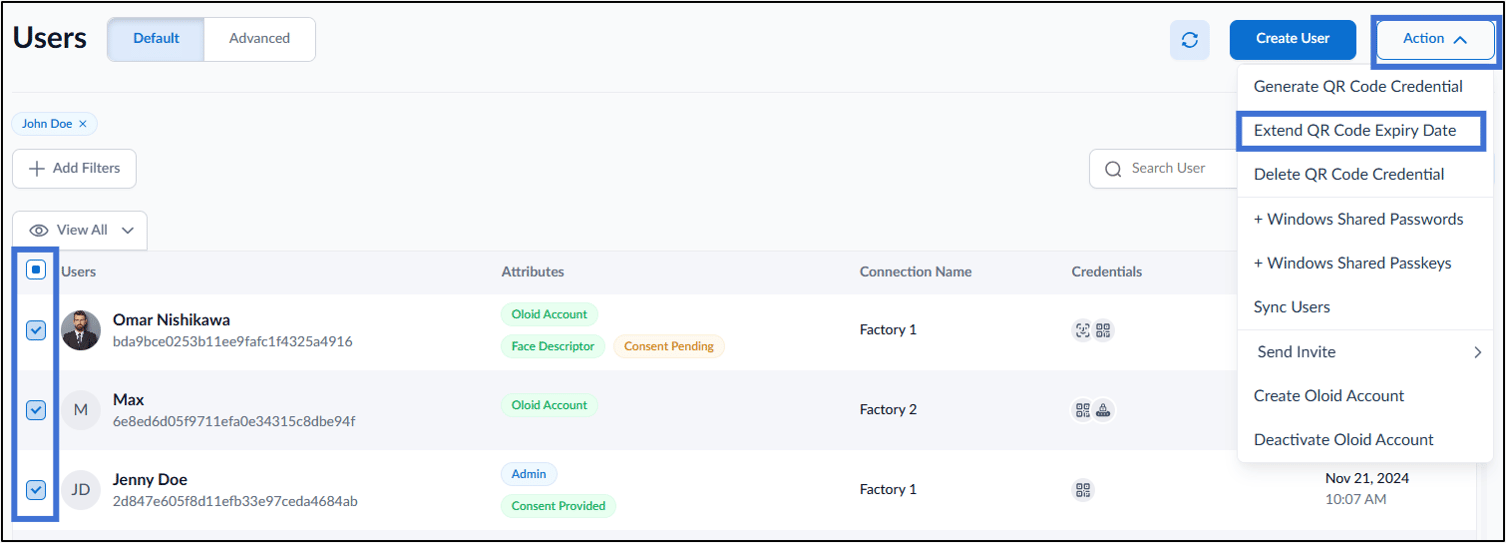
- Select users.
- Go to Action > Extend QR Code Expiry Date.
- On the pop-up box, do the following:
- Under QR Code Validity field adjust the date and time from the calendar icon.
- Under Share Summary With field enter the email ID(s) with whom you want to share the QR Code summary. (optional)
- Click Assign.