

Introduction
This document explains how to apply an Endpoint Template during the auto-pair configuration process for the Oloid Connect application. Applying the Endpoint Template ensures that predefined settings are automatically assigned to endpoint as part of the pairing process.Prerequisites
- You have Tenant Admin access to the Tenant Admin Portal.
- An Endpoint Template has been created. To create referHow to create and configure Oloid Connect endpoint template
Steps at a Glance
- Create the Oloid Connect application in the Tenant Admin Portal and select the desired endpoint template in the “Apply Endpoint Template” field.
- Generate and download the auto-pair config file; ensure it is mapped to the application with the predefined template.
- Pair the Oloid Connect endpoint using the auto-pair option. The endpoint template is applied automatically.
Steps to Apply Endpoint Template During Auto-Pair Process
Step 1: Create and Configure the Oloid Connect Application
- Log in to the Tenant Admin Portal.
-
Create the Oloid Connect application. ReferHow to create and configure Oloid Connect Application in Tenant Admin Portal
Note: If Oloid Connect application is already created then select the desired application from the application list.
-
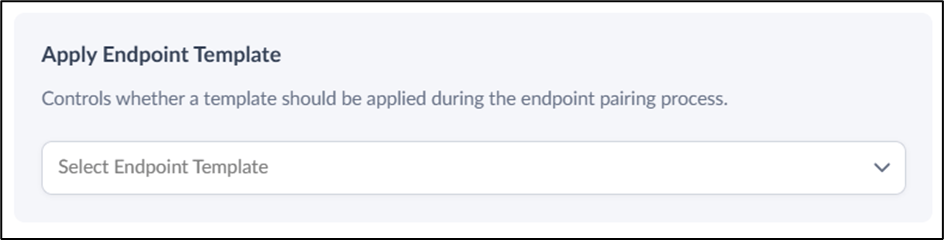
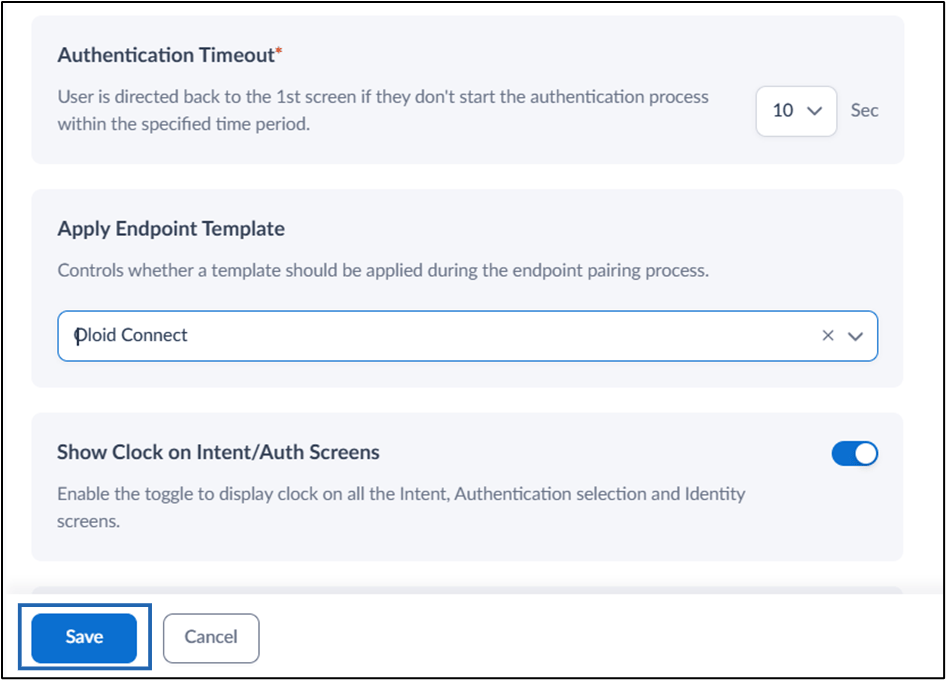
In the Settings section, select the applicable template from Apply Endpoint Template dropdown.
Note: Endpoint template must be added to apply template when using auto-pair option to pair the endpoint.
-
Select Save.
Step 2: Generate and Download the Auto-config File
-
Generate and download the auto-pair config file. Refer How to generate Auto-Pair config file for Oloid Connect in Tenant Admin Portal
Note: Ensure that the Application Mapping includes the application where the Endpoint Template is specified. This mapping ensures that auto-pair applies the correct endpoint configuration.

Step 3: Pair Oloid Connect endpoint with Auto-config File
- On the target iPad, launch the Oloid Connect App.
Note: Once the auto-pair process completes, the Endpoint Template settings is automatically applied to the paired endpoint.