This document provides step-by-step instructions to invite to add face in the Supervisor Portal.
Steps to Invite to Add Face:
Log in to the Supervisor Portal.
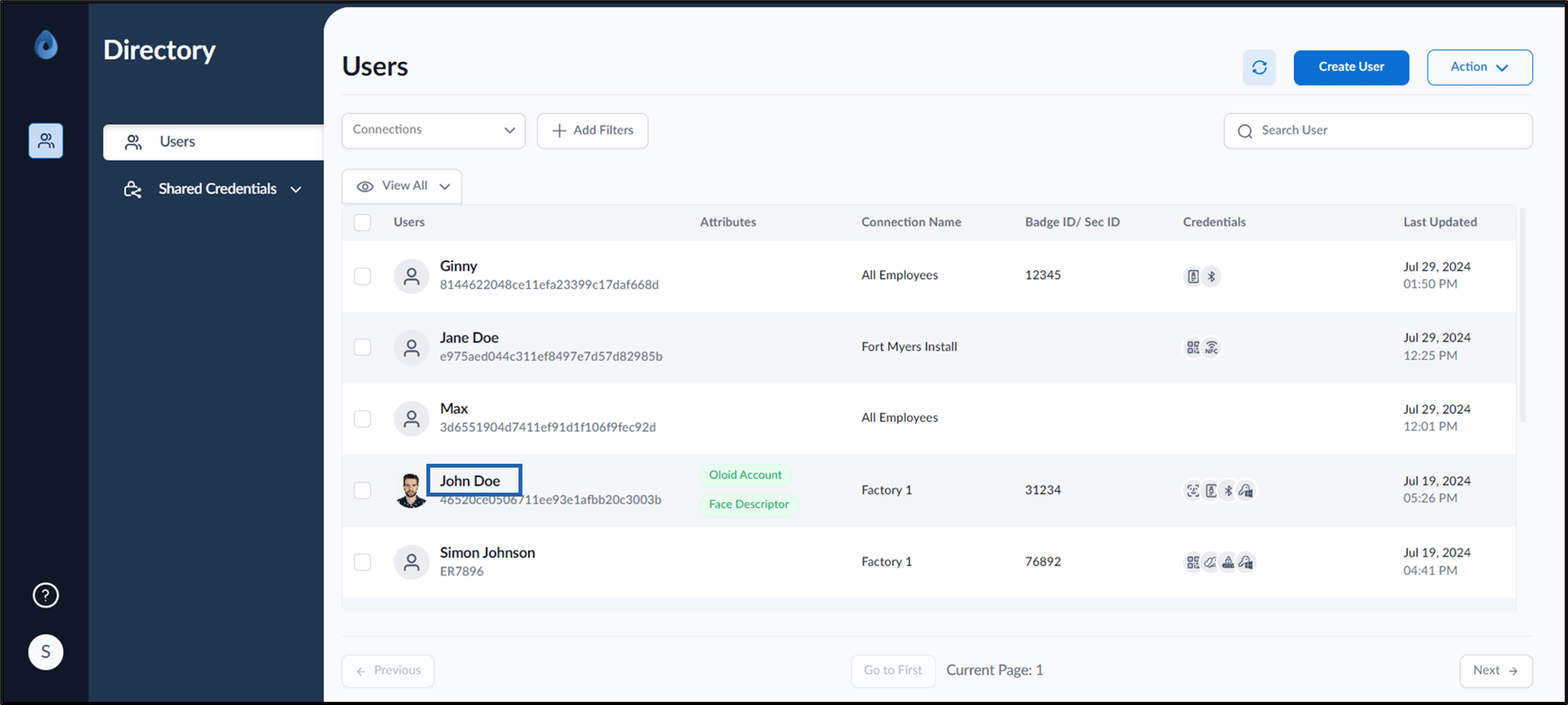
The Users page is displayed.
Click username to edit.
The user details page is displayed.
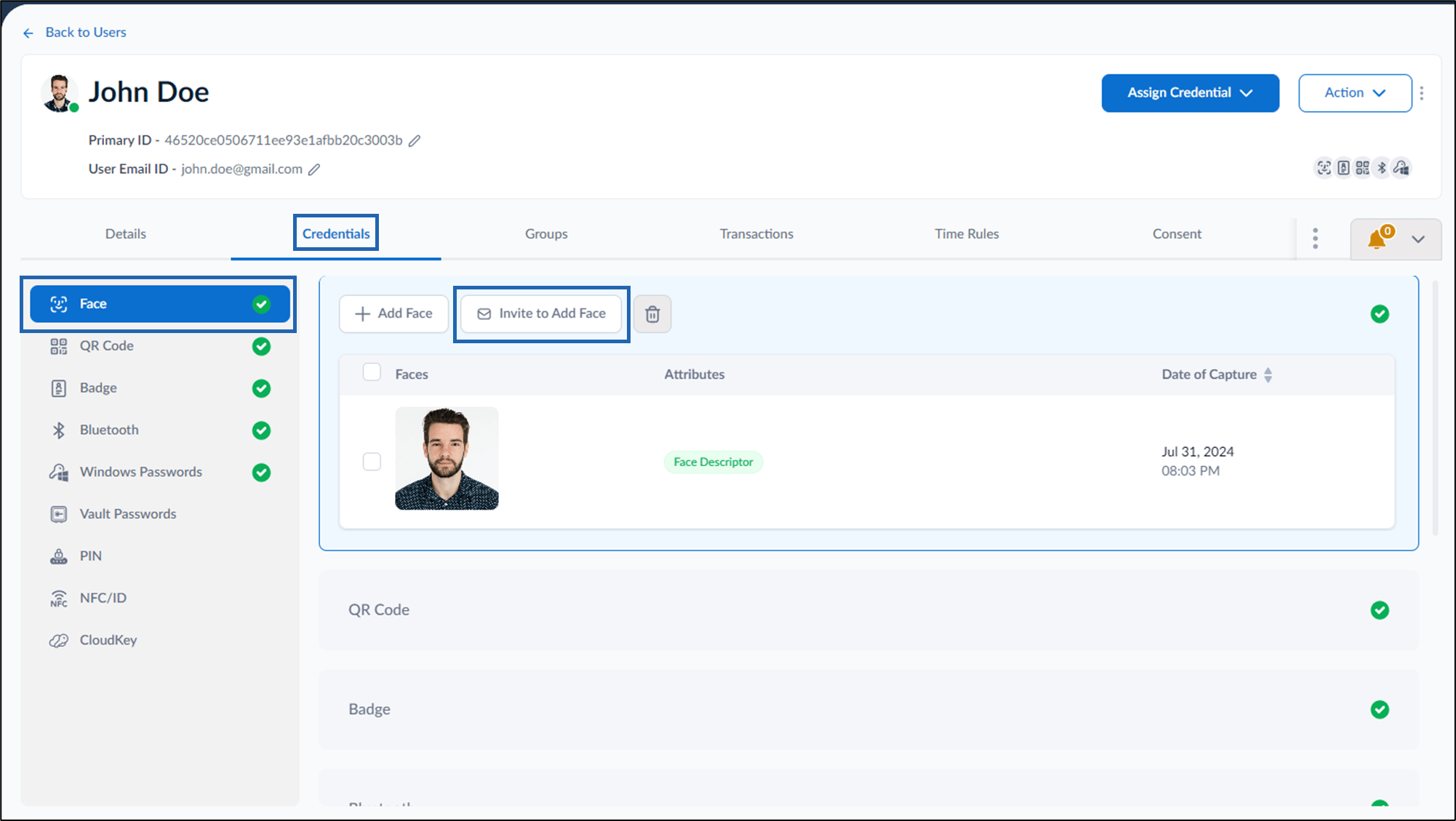
Go to Credentials > Face > Invite to Add Face.An email invite link is sent to user to upload their face.To upload face using the invite link, see How to add face using the invite link.
{"docsConfig":{"theme":"luma","$schema":"https://mintlify.com/docs.json","name":"Oloid","colors":{"primary":"#0D9373"},"logo":{"light":"https://mintcdn.com/oloid-999c42b2/KE1myQzrXITQqA5b/logo/light.svg?fit=max\u0026auto=format\u0026n=KE1myQzrXITQqA5b\u0026q=85\u0026s=630633fc12f78e466404c2956bec0212","dark":"https://mintcdn.com/oloid-999c42b2/KE1myQzrXITQqA5b/logo/dark.svg?fit=max\u0026auto=format\u0026n=KE1myQzrXITQqA5b\u0026q=85\u0026s=109b7cef911bc5a172d67af520e3a644"},"favicon":"https://mintcdn.com/oloid-999c42b2/VbAhyqXuqqWYdBDH/favicon.svg?fit=max\u0026auto=format\u0026n=VbAhyqXuqqWYdBDH\u0026q=85\u0026s=9bd8d49aad7b5cfd765e0ac69a6dcd20","footer":{"socials":{"github":"https://github.com/proxce"}},"styling":{"eyebrows":"breadcrumbs","latex":true},"contextual":{"options":["copy","view","download-pdf","claude","chatgpt"],"display":"header"},"navigation":{"pages":[]}},"deployment":{"deploymentMetadataValue":{"subdomain":"oloid-999c42b2","hasAudioNarration":false,"actualSubdomain":"oloid-999c42b2","customDomains":["docs.oloid-demo.com"],"gitSource":{"type":"github","owner":"proxce","repo":"docs","deployBranch":"internal","contentDirectory":"","isPrivate":false,"mountPath":"","label":""},"chroma":{"latestBuiltDeploymentHistoryId":"6ae471d37914d563fd67194b","collectionId":"10e9e0a2-f7b5-4f2b-8991-d5dd7ce8d321","liveDeploymentHistoryId":"6ae471d37914d563fd67194b","schemaVersion":"v3"},"entitlements":{"AI_CHAT":{"status":"ENABLED"},"REMOVE_BRANDING":{"status":"ENABLED"},"CONTEXTUAL_FEEDBACK":{"status":"ENABLED"},"CODE_SNIPPET_FEEDBACK":{"status":"ENABLED"},"WEB_MCP":{"status":"ENABLED"},"NARRATION":{"status":"ENABLED"}},"buildId":"6ae471d37914d563fd67194b","clientVersion":"0.0.4021","searchFilterCounts":[{"language":"default","tag":"Drafts","count":492},{"language":"default","tag":"Administration","count":464},{"language":"default","tag":"Unassigned","count":419},{"language":"default","tag":"Unassigned in Intercom","count":382},{"language":"default","tag":"Platform","count":368},{"language":"default","tag":"Videos","count":362},{"language":"default","tag":"Device","count":271},{"language":"default","tag":"Windows","count":247},{"language":"default","tag":"iOS","count":209},{"language":"default","tag":"WebKey","count":132}],"searchSettings":{"maxResults":100,"showContentSnippets":true,"isFiltersEnabled":true}},"assistantConfig":{"enableAskAiButton":false,"enableStarterQuestions":true,"enableContextualStarterQuestions":true,"enableAskAiSearchBar":true,"deflection":{"enabled":true,"email":"varun.mahurkar@oloid.ai"}},"basePath":"","hasChatPermissions":true,"hasWebMcpPermissions":true,"toggles":[{"name":"kill-isr","enabled":true,"variant":{"name":"disabled","enabled":false,"feature_enabled":true},"impressionData":false},{"name":"agent-mintlify-slack","enabled":true,"variant":{"name":"disabled","enabled":false,"feature_enabled":true},"impressionData":false},{"name":"agent-integrations-settings","enabled":true,"variant":{"name":"disabled","enabled":false,"feature_enabled":true},"impressionData":false},{"name":"automations-pr-grouping","enabled":true,"variant":{"name":"disabled","enabled":false,"feature_enabled":true},"impressionData":false},{"name":"custom-prefix","enabled":true,"variant":{"name":"disabled","enabled":false,"feature_enabled":true},"impressionData":false},{"name":"analytics-v7","enabled":true,"variant":{"name":"disabled","enabled":false,"feature_enabled":true},"impressionData":false},{"name":"user-flows-analytics","enabled":true,"variant":{"name":"disabled","enabled":false,"feature_enabled":true},"impressionData":false},{"name":"no-publish-flow","enabled":true,"variant":{"name":"disabled","enabled":false,"feature_enabled":true},"impressionData":false},{"name":"workos-onboarding","enabled":true,"variant":{"name":"disabled","enabled":false,"feature_enabled":true},"impressionData":false},{"name":"llms-txt-v2","enabled":true,"variant":{"name":"disabled","enabled":false,"feature_enabled":true},"impressionData":false},{"name":"snapshot-serving-live","enabled":true,"variant":{"name":"disabled","enabled":false,"feature_enabled":true},"impressionData":false},{"name":"stripTemperatureMiddleware","enabled":true,"variant":{"name":"disabled","enabled":false,"feature_enabled":true},"impressionData":false},{"name":"support-platform-pylon-zendesk","enabled":true,"variant":{"name":"disabled","enabled":false,"feature_enabled":true},"impressionData":false},{"name":"snapshot-serving","enabled":true,"variant":{"name":"disabled","enabled":false,"feature_enabled":true},"impressionData":false},{"name":"instant-rollback","enabled":true,"variant":{"name":"disabled","enabled":false,"feature_enabled":true},"impressionData":false},{"name":"granular-notifications-server","enabled":true,"variant":{"name":"disabled","enabled":false,"feature_enabled":true},"impressionData":false},{"name":"granular-notifications","enabled":true,"variant":{"name":"disabled","enabled":false,"feature_enabled":true},"impressionData":false},{"name":"automations-fable","enabled":true,"variant":{"name":"disabled","enabled":false,"feature_enabled":true},"impressionData":false},{"name":"fixed-ai-action-pricing","enabled":true,"variant":{"name":"disabled","enabled":false,"feature_enabled":true},"impressionData":false},{"name":"automation-resolve-merge-conflict","enabled":true,"variant":{"name":"disabled","enabled":false,"feature_enabled":true},"impressionData":false},{"name":"scoped-publishing","enabled":true,"variant":{"name":"disabled","enabled":false,"feature_enabled":true},"impressionData":false},{"name":"mintql","enabled":true,"variant":{"name":"disabled","enabled":false,"feature_enabled":true},"impressionData":false},{"name":"page-level-analytics","enabled":true,"variant":{"name":"disabled","enabled":false,"feature_enabled":true},"impressionData":false},{"name":"editor-version-history-v2","enabled":true,"variant":{"name":"disabled","enabled":false,"feature_enabled":true},"impressionData":false},{"name":"billing-page-v2","enabled":true,"variant":{"name":"disabled","enabled":false,"feature_enabled":true},"impressionData":false},{"name":"workspace-projects","enabled":true,"variant":{"name":"disabled","enabled":false,"feature_enabled":true},"impressionData":false},{"name":"assistant-v5","enabled":true,"variant":{"name":"disabled","enabled":false,"feature_enabled":true},"impressionData":false},{"name":"byok-sep-25","enabled":true,"variant":{"name":"disabled","enabled":false,"feature_enabled":true},"impressionData":false},{"name":"fork-pr-previews","enabled":true,"variant":{"name":"disabled","enabled":false,"feature_enabled":true},"impressionData":false},{"name":"revalidation-jwt","enabled":true,"variant":{"name":"disabled","enabled":false,"feature_enabled":true},"impressionData":false},{"name":"vite-origin","enabled":true,"variant":{"name":"disabled","enabled":false,"feature_enabled":true},"impressionData":false},{"name":"billing-updated-9-15","enabled":true,"variant":{"name":"disabled","enabled":false,"feature_enabled":true},"impressionData":false},{"name":"workos-sso-scim","enabled":true,"variant":{"name":"disabled","enabled":false,"feature_enabled":true},"impressionData":false},{"name":"hobby-abuse-scan","enabled":true,"variant":{"name":"disabled","enabled":false,"feature_enabled":true},"impressionData":false},{"name":"dashboard-inbox","enabled":true,"variant":{"name":"disabled","enabled":false,"feature_enabled":true},"impressionData":false},{"name":"workos-signup","enabled":true,"variant":{"name":"disabled","enabled":false,"feature_enabled":true},"impressionData":false},{"name":"workos-enabled","enabled":true,"variant":{"name":"disabled","enabled":false,"feature_enabled":true},"impressionData":false},{"name":"approve-review-flow","enabled":true,"variant":{"name":"disabled","enabled":false,"feature_enabled":true},"impressionData":false}],"googleFontsInlined":false},"customCss":[{"filePath":"ask-oloid.css","content":"@keyframes ask-oloid-bounce{0%,60%,to{transform:translateY(0);opacity:.5}30%{transform:translateY(-4px);opacity:1}}:root{--ao-primary:#0D9373;--ao-primary-hover:#0b7d62;--ao-primary-soft:rgb(13 147 115 / 0.10);--ao-bg:#ffffff;--ao-surface:#f6f7f8;--ao-border:rgb(0 0 0 / 0.08);--ao-text:#111827;--ao-muted:#6b7280;--ao-width:420px;--ao-font:system-ui, -apple-system, \"Segoe UI\", Roboto, Helvetica, Arial, sans-serif}:root[class~=dark]{--ao-primary-soft:rgb(13 147 115 / 0.18);--ao-bg:#0f1115;--ao-surface:#1a1d23;--ao-border:rgb(255 255 255 / 0.10);--ao-text:#f3f4f6;--ao-muted:#9ca3af}.ask-oloid-button{display:inline-flex;align-items:center;gap:.4rem;height:2rem;padding:0 .85rem;margin-left:.5rem;border:0;border-radius:999px;background:var(--ao-primary);color:#fff;font:600 13px/1 var(--ao-font);white-space:nowrap;cursor:pointer;box-shadow:0 1px 2px rgb(0 0 0/.12);transition:background .15s ease,transform .15s ease,box-shadow .15s ease}.ask-oloid-button:hover{background:var(--ao-primary-hover);box-shadow:0 2px 8px rgb(13 147 115/.35)}.ask-oloid-button:active{transform:scale(.97)}.ask-oloid-button:focus-visible{outline:2px solid var(--ao-primary);outline-offset:2px}.ask-oloid-button svg{width:15px;height:15px}.ask-oloid-button--floating{position:fixed;right:1.25rem;bottom:1.25rem;z-index:9997;height:3rem;padding:0 1.1rem;margin:0;font-size:14px;box-shadow:0 6px 20px rgb(13 147 115/.35)}.ask-oloid-button--floating svg{width:18px;height:18px}.ask-oloid-open .ask-oloid-button--floating{display:none}@media (max-width:640px){.ask-oloid-button{padding:0;width:2rem;justify-content:center}.ask-oloid-button span{display:none}.ask-oloid-button--floating{width:3rem;height:3rem}}.ask-oloid-backdrop{position:fixed;inset:0;z-index:9998;background:rgb(0 0 0/.25);opacity:0;pointer-events:none;transition:opacity .2s ease}.ask-oloid-panel{position:fixed;top:0;right:0;bottom:0;z-index:9999;display:flex;flex-direction:column;width:min(var(--ao-width),100vw);background:var(--ao-bg);color:var(--ao-text);font-family:var(--ao-font);font-size:14px;border-left:1px solid var(--ao-border);box-shadow:-12px 0 32px rgb(0 0 0/.12);transform:translateX(100%);visibility:hidden;transition:transform .25s cubic-bezier(.32,.72,0,1),visibility 0s linear .25s}.ask-oloid-open .ask-oloid-backdrop{opacity:1;pointer-events:auto}.ask-oloid-open .ask-oloid-panel{transform:translateX(0);visibility:visible;transition:transform .25s cubic-bezier(.32,.72,0,1),visibility 0s}.ask-oloid-header{display:flex;align-items:center;justify-content:space-between;padding:.85rem 1rem;border-bottom:1px solid var(--ao-border)}.ask-oloid-header-info{display:flex;align-items:center;gap:.65rem}.ask-oloid-title{font-weight:600;font-size:15px}.ask-oloid-subtitle{display:flex;align-items:center;gap:.35rem;color:var(--ao-muted);font-size:12px;margin-top:2px}.ask-oloid-dot{width:7px;height:7px;border-radius:50%;background:#22c55e}.ask-oloid-header-actions{display:flex;gap:.25rem}.ask-oloid-avatar,.ask-oloid-icon-btn{display:inline-flex;align-items:center;justify-content:center}.ask-oloid-icon-btn{width:2rem;height:2rem;border:0;border-radius:.5rem;background:0 0;color:var(--ao-muted);cursor:pointer}.ask-oloid-icon-btn:hover{background:var(--ao-surface);color:var(--ao-text)}.ask-oloid-icon-btn svg{width:17px;height:17px}.ask-oloid-avatar{flex-shrink:0;width:2.25rem;height:2.25rem;border-radius:50%;background:var(--ao-primary-soft);color:var(--ao-primary)}.ask-oloid-avatar svg{width:18px;height:18px}.ask-oloid-avatar--sm{width:1.75rem;height:1.75rem}.ask-oloid-avatar--sm svg{width:14px;height:14px}.ask-oloid-messages{flex:1;overflow-y:auto;padding:1.25rem 1rem;display:flex;flex-direction:column;gap:.9rem;scroll-behavior:smooth}.ask-oloid-row{display:flex;align-items:flex-end;gap:.5rem}.ask-oloid-row--user{justify-content:flex-end}.ask-oloid-bubble{max-width:82%;padding:.6rem .85rem;border-radius:1rem;line-height:1.5;word-wrap:break-word;overflow-wrap:anywhere}.ask-oloid-row--user .ask-oloid-bubble{background:var(--ao-primary);color:#fff;border-bottom-right-radius:.3rem}.ask-oloid-row--assistant .ask-oloid-bubble{background:var(--ao-surface);color:var(--ao-text);border-bottom-left-radius:.3rem}.ask-oloid-bubble--error{border:1px solid rgb(239 68 68/.4)}.ask-oloid-bubble code{font-size:.9em;padding:.1em .35em;border-radius:.3rem;background:rgb(0 0 0/.08)}.ask-oloid-row--user .ask-oloid-bubble code{background:rgb(255 255 255/.2)}.ask-oloid-bubble pre{padding:.6rem .75rem;border-radius:.5rem;background:rgb(0 0 0/.08);white-space:pre}.ask-oloid-bubble pre code{padding:0;background:0 0}.ask-oloid-bubble pre,.ask-oloid-table{margin:.4rem 0;overflow-x:auto}.ask-oloid-table table{border-collapse:collapse;font-size:.92em;width:100%}.ask-oloid-table td,.ask-oloid-table th{padding:.3rem .5rem;border:1px solid var(--ao-border);text-align:left;vertical-align:top}.ask-oloid-table th{background:var(--ao-surface);font-weight:600}.ask-oloid-bubble a{color:var(--ao-primary);font-weight:500;text-decoration:underline;text-underline-offset:2px}.ask-oloid-row--user .ask-oloid-bubble a{color:#fff}.ask-oloid-typing{display:inline-flex;gap:4px;padding:.8rem .9rem}.ask-oloid-typing span{width:6px;height:6px;border-radius:50%;background:var(--ao-muted);animation:ask-oloid-bounce 1.2s infinite ease-in-out}.ask-oloid-typing span:nth-child(2){animation-delay:.15s}.ask-oloid-typing span:nth-child(3){animation-delay:.3s}.ask-oloid-welcome{margin:auto 0;display:flex;flex-direction:column;align-items:center;text-align:center;padding:1rem .5rem}.ask-oloid-welcome-icon{display:inline-flex;align-items:center;justify-content:center;width:3rem;height:3rem;border-radius:1rem;background:var(--ao-primary-soft);color:var(--ao-primary);margin-bottom:.85rem}.ask-oloid-welcome-icon svg{width:24px;height:24px}.ask-oloid-welcome h3{margin:0;font-size:17px;font-weight:600;color:var(--ao-text)}.ask-oloid-welcome p{margin:.35rem 0 1.25rem;color:var(--ao-muted);font-size:13px}.ask-oloid-suggestions{display:flex;flex-direction:column;gap:.5rem;width:100%}.ask-oloid-suggestion{width:100%;text-align:left;padding:.65rem .85rem;border:1px solid var(--ao-border);border-radius:.75rem;background:var(--ao-bg);color:var(--ao-text);font:13px/1.4 var(--ao-font);cursor:pointer;transition:border-color .15s ease,background .15s ease}.ask-oloid-suggestion:hover{border-color:var(--ao-primary);background:var(--ao-primary-soft)}.ask-oloid-composer{padding:.75rem 1rem .9rem;border-top:1px solid var(--ao-border)}.ask-oloid-input-wrap{display:flex;align-items:flex-end;gap:.5rem;padding:.45rem .45rem .45rem .85rem;border:1px solid var(--ao-border);border-radius:1rem;background:var(--ao-surface);transition:border-color .15s ease,box-shadow .15s ease}.ask-oloid-input-wrap:focus-within{border-color:var(--ao-primary);box-shadow:0 0 0 3px var(--ao-primary-soft)}.ask-oloid-input{flex:1;min-height:1.5rem;max-height:160px;padding:.3rem 0;border:0;outline:0;resize:none;background:0 0;color:var(--ao-text);font:14px/1.5 var(--ao-font)}.ask-oloid-input::placeholder{color:var(--ao-muted)}.ask-oloid-send{display:inline-flex;align-items:center;justify-content:center;flex-shrink:0;width:2rem;height:2rem;border:0;border-radius:.65rem;background:var(--ao-primary);color:#fff;cursor:pointer;transition:background .15s ease,opacity .15s ease}.ask-oloid-send:hover:not(:disabled){background:var(--ao-primary-hover)}.ask-oloid-send:disabled{opacity:.4;cursor:not-allowed}.ask-oloid-send svg{width:16px;height:16px}.ask-oloid-disclaimer{margin:.5rem 0 0;text-align:center;color:var(--ao-muted);font-size:11px}@media print{.ask-oloid-backdrop,.ask-oloid-button,.ask-oloid-panel{display:none!important}}"},{"filePath":"style.css","content":":root{--oloid-font:system-ui, -apple-system, \"Segoe UI\", Roboto, Helvetica, Arial,\n sans-serif, \"Apple Color Emoji\", \"Segoe UI Emoji\";--oloid-body-size:15px;--oloid-leading:1.6;--oloid-rail:16.6667%;--oloid-rail-of-main:20%;--oloid-article-measure:min(100%, 100ch);--oloid-h1:27px;--oloid-h2:19px;--oloid-h3:16.5px;--oloid-h4:15px;--oloid-h5:13.5px;--oloid-small:13.5px;--oloid-nav:12px;--oloid-toc:12px;--oloid-eyebrow:11px;--oloid-hairline:rgb(0 0 0 / 0.10)}:root[class~=dark]{--oloid-hairline:rgb(255 255 255 / 0.14)}#content-area,.mdx-content{font-family:var(--oloid-font);font-size:var(--oloid-body-size);line-height:var(--oloid-leading)}.mdx-content li,.mdx-content p{text-wrap:pretty}@media (min-width:1024px){#sidebar-content{width:var(--oloid-rail)}#body-content{padding-left:var(--oloid-rail)}#content-container>div.flex-1.min-w-0{display:grid;grid-template-columns:100%;justify-items:center}#content-area{width:100%;max-width:var(--oloid-article-measure);margin-left:0;margin-right:0;padding-left:2rem;padding-right:2rem}}@media (min-width:1280px){#content-side-layout{width:var(--oloid-rail-of-main);max-width:none}}#content-area h1,.mdx-content h1{font-family:var(--oloid-font);font-size:var(--oloid-h1);line-height:1.22;font-weight:700;letter-spacing:-.018em;margin-bottom:.45em}.mdx-content h2,.mdx-content h3{font-family:var(--oloid-font);font-size:var(--oloid-h2);line-height:1.25;font-weight:600;letter-spacing:-.011em;margin-top:1.9em;margin-bottom:.6em}.mdx-content h3{font-size:var(--oloid-h3);line-height:1.32;letter-spacing:-.007em;margin-top:1.65em;margin-bottom:.5em}.mdx-content h4,.mdx-content h5{font-family:var(--oloid-font);font-size:var(--oloid-h4);line-height:1.4;font-weight:600;margin-top:1.4em;margin-bottom:.45em}.mdx-content h5{font-size:var(--oloid-h5);line-height:1.45;margin-top:1.25em;margin-bottom:.4em}.mdx-content li>p:first-child,.mdx-content>:first-child{margin-top:0}#content-area>header p{font-size:calc(var(--oloid-body-size) + 1px);line-height:1.45}.mdx-content ol,.mdx-content ul{padding-left:1.5em}.mdx-content li{margin-top:.28em;margin-bottom:.28em}.mdx-content li::marker{font-weight:600}.mdx-content li>p{margin-top:.25em;margin-bottom:.25em}.mdx-content li>p:last-child{margin-bottom:0}.mdx-content li>ol,.mdx-content li>ul{margin-top:.35em;margin-bottom:.6em}.mdx-content img{border:1px solid var(--oloid-hairline);margin-top:.55em;margin-bottom:.55em}.mdx-content>p>img{margin-top:.9em;margin-bottom:1.1em}.mdx-content .frame{margin-top:1.1em;margin-bottom:1.3em}.mdx-content li .frame{margin-top:.55em;margin-bottom:.75em}.mdx-content .callout{font-size:var(--oloid-small);line-height:1.5;padding:.7rem .95rem;border-radius:.6rem;margin:.7em 0}.mdx-content li .callout{margin-top:.4em;margin-bottom:.4em}.mdx-content .callout p{margin-top:0;margin-bottom:0}.mdx-content .callout ol,.mdx-content .callout ul{margin-top:.2em;margin-bottom:.2em}.mdx-content .callout li{margin-top:.12em;margin-bottom:.12em}.mdx-content :not(pre)>code{font-size:.86em;font-weight:500;padding:.12em .34em;border-radius:.3rem}.mdx-content table{font-size:var(--oloid-small)}.mdx-content th{font-weight:600}#navigation-items{font-family:var(--oloid-font)}#navigation-items,#navigation-items .sidebar-group-header,#navigation-items .text-sm,#navigation-items a,#navigation-items button,#navigation-items h5{font-size:var(--oloid-nav)!important}#navigation-items a{line-height:1.4}#content-side-layout,#table-of-contents,#table-of-contents .text-sm,#table-of-contents a,#table-of-contents h5,#table-of-contents li,#table-of-contents p{font-size:var(--oloid-toc)!important}#table-of-contents{font-family:var(--oloid-font)}#table-of-contents a{line-height:1.4}#sidebar-content .pl-5.pr-5{padding-right:0}#content-side-layout{padding-left:0}@media print{#content-side-layout,#footer,#navigation-items,#sidebar-content,[class*=breadcrumb]{display:none!important}#body-content,#content-area{padding-left:0!important}#content-container>div.flex-1.min-w-0{display:block!important}#content-area{width:100%!important;max-width:100%!important;padding-right:0!important}.mdx-content .callout,.mdx-content img,.mdx-content li{break-inside:avoid;page-break-inside:avoid}.mdx-content h2,.mdx-content h3,.mdx-content h4{break-after:avoid;page-break-after:avoid}.mdx-content img{max-width:100%;height:auto}#content-area,.mdx-content{font-size:11pt;line-height:1.45}}[class*=breadcrumb]{font-size:var(--oloid-eyebrow);letter-spacing:.01em}:root{--oloid-search-width:260px}#assistant-entry,#search-bar-entry,#topbar-search,[class*=search-bar],[id^=search-bar]{max-width:var(--oloid-search-width)!important;width:100%;margin-left:auto}#topbar :is(#search-bar-entry, #assistant-entry){flex:0 1 var(--oloid-search-width)}@media (max-width:1023px){#assistant-entry,#search-bar-entry,#topbar-search{max-width:none!important}}"}],"page":{"pagePath":"administration/supervisor-portal/users/supervisor-portal-how-to-invite-to-add-face","slug":"/administration/supervisor-portal/users/supervisor-portal-how-to-invite-to-add-face","pageMetadata":{"title":"Supervisor Portal - How to invite to add face","sidebarTitle":"How to invite to add face","description":"This document provides step-by-step instructions to invite to add face in the Supervisor Portal.","icon":"file-lines","href":"/administration/supervisor-portal/users/supervisor-portal-how-to-invite-to-add-face"},"description":{"compiledSource":"\"use strict\";\nconst {jsx: _jsx} = arguments[0];\nconst {useMDXComponents: _provideComponents} = arguments[0];\nfunction _createMdxContent(props) {\n const _components = {\n p: \"p\",\n ..._provideComponents(),\n ...props.components\n };\n return _jsx(_components.p, {\n children: \"This document provides step-by-step instructions to invite to add face in the Supervisor Portal.\"\n });\n}\nfunction MDXContent(props = {}) {\n const {wrapper: MDXLayout} = {\n ..._provideComponents(),\n ...props.components\n };\n return MDXLayout ? _jsx(MDXLayout, {\n ...props,\n children: _jsx(_createMdxContent, {\n ...props\n })\n }) : _createMdxContent(props);\n}\nreturn {\n default: MDXContent\n};\n","frontmatter":{},"scope":{}},"pageType":"default","mdx":{"mdxSource":{"compiledSource":"\"use strict\";const{Fragment:_Fragment,jsx:_jsx,jsxs:_jsxs}=arguments[0];const{useMDXComponents:_provideComponents}=arguments[0];function _createMdxContent(props){const _components={a:`a`,li:`li`,ol:`ol`,p:`p`,strong:`strong`,..._provideComponents(),...props.components},{Heading,OptimizedImage}=_components;if(!Heading)_missingMdxReference(`Heading`,true);if(!OptimizedImage)_missingMdxReference(`OptimizedImage`,true);return _jsxs(_Fragment,{children:[_jsx(_components.p,{children:`Steps to Invite to Add Face:`}),`\n`,_jsxs(_components.ol,{children:[`\n`,_jsxs(_components.li,{children:[`Log in to the `,_jsx(_components.strong,{children:`Supervisor Portal`}),`.\nThe `,_jsx(_components.strong,{children:`Users`}),` page is displayed.`]}),`\n`,_jsxs(_components.li,{children:[`Click `,_jsx(_components.strong,{children:`username`}),` to edit.`,`\n`,_jsx(OptimizedImage,{src:`https://mintcdn.com/oloid-999c42b2/9D2pDBnahjm71jl4/images/intercom/9673759/7046f59b-7e08-4971-9372-8bd19055bc69-aea17ab3.png?fit=max\u0026auto=format\u0026n=9D2pDBnahjm71jl4\u0026q=85\u0026s=f6e5aa1eac7a9f24c56c2a688306e43a`,alt:`Image`,\"data-og-width\":`2004`,width:`2004`,\"data-og-height\":`901`,height:`901`,\"data-path\":`images/intercom/9673759/7046f59b-7e08-4971-9372-8bd19055bc69-aea17ab3.png`,\"data-optimize\":`true`,\"data-opv\":`3`,srcset:`https://mintcdn.com/oloid-999c42b2/9D2pDBnahjm71jl4/images/intercom/9673759/7046f59b-7e08-4971-9372-8bd19055bc69-aea17ab3.png?w=280\u0026fit=max\u0026auto=format\u0026n=9D2pDBnahjm71jl4\u0026q=85\u0026s=184a7c81a926d23e1142457be74f12b9 280w, https://mintcdn.com/oloid-999c42b2/9D2pDBnahjm71jl4/images/intercom/9673759/7046f59b-7e08-4971-9372-8bd19055bc69-aea17ab3.png?w=560\u0026fit=max\u0026auto=format\u0026n=9D2pDBnahjm71jl4\u0026q=85\u0026s=cb00f3939bffde4c3babb9c2dfe1ab8c 560w, https://mintcdn.com/oloid-999c42b2/9D2pDBnahjm71jl4/images/intercom/9673759/7046f59b-7e08-4971-9372-8bd19055bc69-aea17ab3.png?w=840\u0026fit=max\u0026auto=format\u0026n=9D2pDBnahjm71jl4\u0026q=85\u0026s=ee5d7ed62bf74a410c78a88f9aa87e06 840w, https://mintcdn.com/oloid-999c42b2/9D2pDBnahjm71jl4/images/intercom/9673759/7046f59b-7e08-4971-9372-8bd19055bc69-aea17ab3.png?w=1100\u0026fit=max\u0026auto=format\u0026n=9D2pDBnahjm71jl4\u0026q=85\u0026s=36a42da77c00b75efffa779c88663693 1100w, https://mintcdn.com/oloid-999c42b2/9D2pDBnahjm71jl4/images/intercom/9673759/7046f59b-7e08-4971-9372-8bd19055bc69-aea17ab3.png?w=1650\u0026fit=max\u0026auto=format\u0026n=9D2pDBnahjm71jl4\u0026q=85\u0026s=88270950e12bc5d59e95f73b9f5cd42c 1650w, https://mintcdn.com/oloid-999c42b2/9D2pDBnahjm71jl4/images/intercom/9673759/7046f59b-7e08-4971-9372-8bd19055bc69-aea17ab3.png?w=2500\u0026fit=max\u0026auto=format\u0026n=9D2pDBnahjm71jl4\u0026q=85\u0026s=d87c90a85853d1add2a5107de3617007 2500w`}),`\n`,`The user details page is displayed.`]}),`\n`]}),`\n`,_jsxs(_components.p,{children:[`Go to `,_jsx(_components.strong,{children:`Credentials`}),` > `,_jsx(_components.strong,{children:`Face`}),` > `,_jsx(_components.strong,{children:`Invite to Add Face`}),`.`]}),`\n`,_jsx(OptimizedImage,{src:`https://mintcdn.com/oloid-999c42b2/9D2pDBnahjm71jl4/images/intercom/9673759/image-dc434fa9.png?fit=max\u0026auto=format\u0026n=9D2pDBnahjm71jl4\u0026q=85\u0026s=cb85f761d49ec126705a74e5dddc4069`,alt:`How to invite to add face - screenshot 1`,\"data-og-width\":`2002`,width:`2002`,\"data-og-height\":`1129`,height:`1129`,\"data-path\":`images/intercom/9673759/image-dc434fa9.png`,\"data-optimize\":`true`,\"data-opv\":`3`,srcset:`https://mintcdn.com/oloid-999c42b2/9D2pDBnahjm71jl4/images/intercom/9673759/image-dc434fa9.png?w=280\u0026fit=max\u0026auto=format\u0026n=9D2pDBnahjm71jl4\u0026q=85\u0026s=6d7cf4a5fdd97ac24e5090184c04b0ab 280w, https://mintcdn.com/oloid-999c42b2/9D2pDBnahjm71jl4/images/intercom/9673759/image-dc434fa9.png?w=560\u0026fit=max\u0026auto=format\u0026n=9D2pDBnahjm71jl4\u0026q=85\u0026s=33f92dbafe54be093c5366a472480a06 560w, https://mintcdn.com/oloid-999c42b2/9D2pDBnahjm71jl4/images/intercom/9673759/image-dc434fa9.png?w=840\u0026fit=max\u0026auto=format\u0026n=9D2pDBnahjm71jl4\u0026q=85\u0026s=2c1d17036b7968b7d5fe95adda08817c 840w, https://mintcdn.com/oloid-999c42b2/9D2pDBnahjm71jl4/images/intercom/9673759/image-dc434fa9.png?w=1100\u0026fit=max\u0026auto=format\u0026n=9D2pDBnahjm71jl4\u0026q=85\u0026s=881c0790e3e9e70bba913d4bd423437b 1100w, https://mintcdn.com/oloid-999c42b2/9D2pDBnahjm71jl4/images/intercom/9673759/image-dc434fa9.png?w=1650\u0026fit=max\u0026auto=format\u0026n=9D2pDBnahjm71jl4\u0026q=85\u0026s=c9be9697d52121ff20655667e29a8bd2 1650w, https://mintcdn.com/oloid-999c42b2/9D2pDBnahjm71jl4/images/intercom/9673759/image-dc434fa9.png?w=2500\u0026fit=max\u0026auto=format\u0026n=9D2pDBnahjm71jl4\u0026q=85\u0026s=d582f8607510e6b7ffa40cf8d39946c1 2500w`}),`\n`,_jsx(_components.p,{children:`An email invite link is sent to user to upload their face.`}),`\n`,_jsxs(_components.p,{children:[`To upload face using the invite link, see `,_jsx(_components.strong,{children:_jsx(_components.a,{href:`https://oloid.help/en/articles/8472935-how-to-add-face-using-the-invite-link-in-oloid-user-portal`,children:`How to add face using the invite link`})}),_jsx(_components.a,{href:`https://oloid.help/en/articles/8472935-how-to-add-face-using-the-invite-link-in-oloid-user-portal`,children:`.`})]}),`\n`,_jsx(Heading,{level:`2`,id:`video-tutorial`,children:`Video Tutorial`}),`\n`,_jsxs(_components.ol,{start:`3`,children:[`\n`,_jsxs(_components.li,{children:[`Watch the video `,_jsx(_components.a,{href:`https://oloid.help/en/articles/9902212-how-to-invite-to-add-face-in-the-supervisor-portal-video-tutorial`,children:`How to invite to add Face in the Supervisor Portal - Video Tutorial`})]}),`\n`]})]})}function MDXContent(props={}){const{wrapper:MDXLayout}={..._provideComponents(),...props.components};return MDXLayout?_jsx(MDXLayout,{...props,children:_jsx(_createMdxContent,{...props})}):_createMdxContent(props)}return{default:MDXContent};function _missingMdxReference(id,component){throw new Error(`Expected `+(component?`component`:`object`)+\" `\"+id+\"` to be defined: you likely forgot to import, pass, or provide it.\")}","frontmatter":{},"scope":{"config":{},"pageMetadata":{"title":"Supervisor Portal - How to invite to add face","sidebarTitle":"How to invite to add face","description":"This document provides step-by-step instructions to invite to add face in the Supervisor Portal.","icon":"file-lines","href":"/administration/supervisor-portal/users/supervisor-portal-how-to-invite-to-add-face"}}},"mdxSourceWithNoJs":null},"mdxExtracts":{"tableOfContents":[{"title":"Video Tutorial","slug":"video-tutorial","depth":2,"children":[]}],"codeExamples":{}},"jsLinks":["/_mintlify/custom/oloid-999c42b2/61a8814754c1aef7/ask-oloid.js"],"subdomain":"oloid-999c42b2","siteName":"Oloid","title":"Supervisor Portal - How to invite to add face - Oloid","contextualStarterQuestions":[{"_id":"6ae472e53ca5cac1bff21566","deploymentId":"6aa96ddc3a56374b00e15738","questionText":"How do I invite users to add face?","status":"active","generatedBy":"contextual","path":"administration/supervisor-portal/users/supervisor-portal-how-to-invite-to-add-face","createdAt":"2026-10-30T10:35:17.724Z","updatedAt":"2026-10-30T10:35:17.724Z","__v":0},{"_id":"6ae472e53ca5cac1bff21568","deploymentId":"6aa96ddc3a56374b00e15738","questionText":"What are the first steps to begin?","status":"active","generatedBy":"contextual","path":"administration/supervisor-portal/users/supervisor-portal-how-to-invite-to-add-face","createdAt":"2026-10-30T10:35:17.724Z","updatedAt":"2026-10-30T10:35:17.724Z","__v":0},{"_id":"6ae472e53ca5cac1bff21567","deploymentId":"6aa96ddc3a56374b00e15738","questionText":"Where do I find the invite option?","status":"active","generatedBy":"contextual","path":"administration/supervisor-portal/users/supervisor-portal-how-to-invite-to-add-face","createdAt":"2026-10-30T10:35:17.724Z","updatedAt":"2026-10-30T10:35:17.724Z","__v":0}],"navMaps":{"firstHrefInVersion":{},"firstHrefInLanguage":{}},"lastModified":"2026-10-30T10:33:20.879Z","originalFileLocation":"administration/supervisor-portal/users/supervisor-portal-how-to-invite-to-add-face.mdx"},"headHtml":"\u003cscript data-mint-head>(function(){var d=document.documentElement,p=null;if(!p){try{p=localStorage.getItem(\"isDarkMode\")}catch(e){}if(p==='true')p='dark';else if(p==='false')p='light';if(p!=='light'\u0026\u0026p!=='dark'\u0026\u0026p!=='system')p=\"system\"}var r=p==='system'?(matchMedia(\"(prefers-color-scheme: dark)\").matches?'dark':'light'):p;d.classList.remove(r==='dark'?'light':'dark');d.classList.add(r);d.setAttribute(\"data-theme-preference\",p)})();\u003c/script>\u003cmeta data-mint-head name=\"description\" content=\"This document provides step-by-step instructions to invite to add face in the Supervisor Portal.\">\u003cmeta data-mint-head name=\"application-name\" content=\"Oloid\">\u003cmeta data-mint-head name=\"generator\" content=\"Mintlify\">\u003clink data-mint-head rel=\"icon\" type=\"image/png\" sizes=\"192x192\" href=\"/mintlify-assets/_mintlify/favicons/oloid-999c42b2/FglCo9o0GNP9ibvu/_generated/favicon/android-chrome-192x192.png\" media=\"(prefers-color-scheme: light)\">\u003clink data-mint-head rel=\"apple-touch-icon\" type=\"image/png\" sizes=\"180x180\" href=\"/mintlify-assets/_mintlify/favicons/oloid-999c42b2/FglCo9o0GNP9ibvu/_generated/favicon/apple-touch-icon.png\">\u003clink data-mint-head rel=\"icon\" type=\"image/png\" sizes=\"16x16\" href=\"/mintlify-assets/_mintlify/favicons/oloid-999c42b2/FglCo9o0GNP9ibvu/_generated/favicon/favicon-16x16.png\" media=\"(prefers-color-scheme: light)\">\u003clink data-mint-head rel=\"icon\" type=\"image/png\" sizes=\"32x32\" href=\"/mintlify-assets/_mintlify/favicons/oloid-999c42b2/FglCo9o0GNP9ibvu/_generated/favicon/favicon-32x32.png\" media=\"(prefers-color-scheme: light)\">\u003clink data-mint-head rel=\"shortcut icon\" type=\"image/x-icon\" href=\"/mintlify-assets/_mintlify/favicons/oloid-999c42b2/FglCo9o0GNP9ibvu/_generated/favicon/favicon.ico\" media=\"(prefers-color-scheme: light)\">\u003clink data-mint-head rel=\"icon\" type=\"image/png\" sizes=\"192x192\" href=\"/mintlify-assets/_mintlify/favicons/oloid-999c42b2/FglCo9o0GNP9ibvu/_generated/favicon-dark/android-chrome-192x192.png\" media=\"(prefers-color-scheme: dark)\">\u003clink data-mint-head rel=\"icon\" type=\"image/png\" sizes=\"16x16\" href=\"/mintlify-assets/_mintlify/favicons/oloid-999c42b2/FglCo9o0GNP9ibvu/_generated/favicon-dark/favicon-16x16.png\" media=\"(prefers-color-scheme: dark)\">\u003clink data-mint-head rel=\"icon\" type=\"image/png\" sizes=\"32x32\" href=\"/mintlify-assets/_mintlify/favicons/oloid-999c42b2/FglCo9o0GNP9ibvu/_generated/favicon-dark/favicon-32x32.png\" media=\"(prefers-color-scheme: dark)\">\u003clink data-mint-head rel=\"shortcut icon\" type=\"image/x-icon\" href=\"/mintlify-assets/_mintlify/favicons/oloid-999c42b2/FglCo9o0GNP9ibvu/_generated/favicon-dark/favicon.ico\" media=\"(prefers-color-scheme: dark)\">\u003cmeta data-mint-head property=\"og:title\" content=\"Supervisor Portal - How to invite to add face - Oloid\">\u003cmeta data-mint-head property=\"og:description\" content=\"This document provides step-by-step instructions to invite to add face in the Supervisor Portal.\">\u003cmeta data-mint-head property=\"og:site_name\" content=\"Oloid\">\u003cmeta data-mint-head property=\"og:url\" content=\"https://docs.oloid-demo.com/administration/supervisor-portal/users/supervisor-portal-how-to-invite-to-add-face\">\u003cmeta data-mint-head property=\"og:type\" content=\"website\">\u003cmeta data-mint-head property=\"og:image\" content=\"https://oloid-999c42b2.mintlify.app/_mintlify/api/og/v2?division=Create+and+manage+users\u0026amp;title=Supervisor+Portal+-+How+to+invite+to+add+face\u0026amp;description=This+document+provides+step-by-step+instructions+to+invite+to+add+face+in+the+Supervisor+Portal.\u0026amp;theme=8476e0a18aed253a8b3caa19\u0026amp;signature=c96f7f1fa52a810bba1c1181957c08736e329ad262c05df3d76533cfb85510aa\">\u003cmeta data-mint-head property=\"og:image:width\" content=\"1200\">\u003cmeta data-mint-head property=\"og:image:height\" content=\"630\">\u003cmeta data-mint-head name=\"twitter:card\" content=\"summary_large_image\">\u003cmeta data-mint-head name=\"twitter:title\" content=\"Supervisor Portal - How to invite to add face - Oloid\">\u003cmeta data-mint-head name=\"twitter:description\" content=\"This document provides step-by-step instructions to invite to add face in the Supervisor Portal.\">\u003cmeta data-mint-head name=\"twitter:image\" content=\"https://oloid-999c42b2.mintlify.app/_mintlify/api/og/v2?division=Create+and+manage+users\u0026amp;title=Supervisor+Portal+-+How+to+invite+to+add+face\u0026amp;description=This+document+provides+step-by-step+instructions+to+invite+to+add+face+in+the+Supervisor+Portal.\u0026amp;theme=8476e0a18aed253a8b3caa19\u0026amp;signature=c96f7f1fa52a810bba1c1181957c08736e329ad262c05df3d76533cfb85510aa\">\u003cmeta data-mint-head name=\"twitter:image:width\" content=\"1200\">\u003cmeta data-mint-head name=\"twitter:image:height\" content=\"630\">\u003cmeta data-mint-head name=\"msapplication-config\" content=\"/mintlify-assets/_mintlify/favicons/oloid-999c42b2/FglCo9o0GNP9ibvu/_generated/favicon/browserconfig.xml\">\u003cmeta data-mint-head name=\"apple-mobile-web-app-title\" content=\"Oloid\">\u003cmeta data-mint-head name=\"msapplication-TileColor\" content=\"#0D9373\">\u003clink data-mint-head rel=\"canonical\" href=\"https://docs.oloid-demo.com/administration/supervisor-portal/users/supervisor-portal-how-to-invite-to-add-face\">\u003clink data-mint-head rel=\"alternate\" type=\"application/xml\" href=\"/sitemap.xml\">\u003clink data-mint-head rel=\"alternate\" type=\"text/markdown\" href=\"/administration/supervisor-portal/users/supervisor-portal-how-to-invite-to-add-face.md\">\u003cscript data-mint-head type=\"application/ld+json\">{\"@context\":\"https://schema.org\",\"@graph\":[{\"@type\":\"Organization\",\"@id\":\"https://docs.oloid-demo.com/#organization\",\"name\":\"Oloid\",\"url\":\"https://docs.oloid-demo.com\",\"logo\":{\"@type\":\"ImageObject\",\"url\":\"https://mintcdn.com/oloid-999c42b2/KE1myQzrXITQqA5b/logo/light.svg?fit=max\u0026auto=format\u0026n=KE1myQzrXITQqA5b\u0026q=85\u0026s=630633fc12f78e466404c2956bec0212\"}},{\"@type\":\"WebSite\",\"@id\":\"https://docs.oloid-demo.com#website\",\"name\":\"Oloid\",\"url\":\"https://docs.oloid-demo.com\",\"publisher\":{\"@id\":\"https://docs.oloid-demo.com/#organization\"}},{\"@type\":\"WebPage\",\"@id\":\"https://docs.oloid-demo.com/administration/supervisor-portal/users/supervisor-portal-how-to-invite-to-add-face#webpage\",\"url\":\"https://docs.oloid-demo.com/administration/supervisor-portal/users/supervisor-portal-how-to-invite-to-add-face\",\"name\":\"Supervisor Portal - How to invite to add face\",\"description\":\"This document provides step-by-step instructions to invite to add face in the Supervisor Portal.\",\"dateModified\":\"2026-10-30T10:33:20.879Z\",\"isPartOf\":{\"@id\":\"https://docs.oloid-demo.com#website\"},\"breadcrumb\":{\"@id\":\"https://docs.oloid-demo.com/administration/supervisor-portal/users/supervisor-portal-how-to-invite-to-add-face#breadcrumb\"}},{\"@type\":\"BreadcrumbList\",\"@id\":\"https://docs.oloid-demo.com/administration/supervisor-portal/users/supervisor-portal-how-to-invite-to-add-face#breadcrumb\",\"itemListElement\":[{\"@type\":\"ListItem\",\"position\":1,\"name\":\"Create and manage users\",\"item\":\"https://docs.oloid-demo.com/administration/supervisor-portal/users/how-to-assign-windows-shared-passwords-to-multiple-users-in\"},{\"@type\":\"ListItem\",\"position\":2,\"name\":\"Supervisor Portal - How to invite to add face\",\"item\":\"https://docs.oloid-demo.com/administration/supervisor-portal/users/supervisor-portal-how-to-invite-to-add-face\"}]},{\"@type\":[\"Article\",\"TechArticle\"],\"@id\":\"https://docs.oloid-demo.com/administration/supervisor-portal/users/supervisor-portal-how-to-invite-to-add-face#article\",\"headline\":\"Supervisor Portal - How to invite to add face\",\"name\":\"Supervisor Portal - How to invite to add face\",\"description\":\"This document provides step-by-step instructions to invite to add face in the Supervisor Portal.\",\"url\":\"https://docs.oloid-demo.com/administration/supervisor-portal/users/supervisor-portal-how-to-invite-to-add-face\",\"mainEntityOfPage\":{\"@id\":\"https://docs.oloid-demo.com/administration/supervisor-portal/users/supervisor-portal-how-to-invite-to-add-face#webpage\"},\"dateModified\":\"2026-10-30T10:33:20.879Z\",\"publisher\":{\"@id\":\"https://docs.oloid-demo.com/#organization\"},\"isPartOf\":{\"@id\":\"https://docs.oloid-demo.com#website\"}}]}\u003c/script>","siteName":"Oloid","nav":{"global":null,"tabs":[{"tab":"Windows","icon":{"style":"brands","name":"windows","library":"fontawesome"},"menu":[{"item":"Getting started","icon":"flag-checkered","pages":[{"title":"Getting started","href":"/windows/getting-started/overview/what-is-oloid-s-windows-login"}]},{"item":"Version 1","icon":"1","pages":[{"title":"Version 1","href":"/windows/version-1/guides/windows-login-1-0-network-url-whitelisting-requirements-for-prod-eu"}]},{"item":"Version 2","icon":"2","pages":[{"title":"Version 2","href":"/windows/version-2/guides/windows-2-0-network-whitelisting-requirements"}]},{"item":"General guides","icon":"book","pages":[{"title":"General guides","href":"/windows/general-guides/admin-guides/how-to-configure-auto-update-feature-in-windows-login-endpoint-in"}]}],"pages":[{"title":"Windows","href":"/windows/getting-started/overview/what-is-oloid-s-windows-login"}]},{"tab":"Device","icon":"mobile-screen","menu":[{"item":"Android","icon":{"style":"brands","name":"android","library":"fontawesome"},"pages":[{"title":"Android","href":"/device/android/getting-started/android-passwordless-device-unlock-with-automatic-okta-login"}]},{"item":"iOS","icon":{"style":"brands","name":"apple","library":"fontawesome"},"pages":[{"title":"iOS","href":"/device/ios/getting-started/faqs-oloid-verify-connect-application"}]}],"pages":[{"title":"Device","href":"/device/android/getting-started/android-passwordless-device-unlock-with-automatic-okta-login"}]},{"tab":"Administration","icon":"gear","menu":[{"item":"User Portal","icon":"user","pages":[{"title":"User Portal","href":"/administration/user-portal/accounts-and-settings/how-to-log-out-oloid-user-portal"}]},{"item":"Supervisor Portal","icon":"display","groups":[{"group":"Create and manage users","pages":[{"title":"How to Assign Windows Shared Passwords to Multiple Users in Supervisor Portal","sidebarTitle":"How to Assign Windows Shared Passwords to...","icon":"file-lines","href":"/administration/supervisor-portal/users/how-to-assign-windows-shared-passwords-to-multiple-users-in"},{"title":"How to create Oloid Account in Supervisor Portal","icon":"file-lines","href":"/administration/supervisor-portal/users/how-to-create-oloid-account-in-supervisor-portal"},{"title":"How to View and Download User Transaction in Supervisor Portal","sidebarTitle":"How to View and Download User Transaction in...","icon":"file-lines","href":"/administration/supervisor-portal/users/how-to-view-and-download-user-transaction-in-supervisor-portal"},{"title":"Supervisor Portal - How to activate or deactivate user","sidebarTitle":"How to activate or deactivate user","icon":"file-lines","href":"/administration/supervisor-portal/users/supervisor-portal-how-to-activate-or-deactivate-user"},{"title":"Supervisor Portal - How to add CloudKey as credential to users","sidebarTitle":"How to add CloudKey as credential to users","icon":"file-lines","href":"/administration/supervisor-portal/users/supervisor-portal-how-to-add-cloudkey-as-credential-to-users"},{"title":"Supervisor Portal - How to add PIN as credential to Users","sidebarTitle":"How to add PIN as credential to Users","icon":"file-lines","href":"/administration/supervisor-portal/users/supervisor-portal-how-to-add-pin-as-credential-to-users"},{"title":"Supervisor Portal - How to add user","sidebarTitle":"How to add user","icon":"file-lines","href":"/administration/supervisor-portal/users/supervisor-portal-how-to-add-user"},{"title":"Supervisor Portal - How to assign Badge ID as credential to Users","sidebarTitle":"How to assign Badge ID as credential to Users","icon":"file-lines","href":"/administration/supervisor-portal/users/supervisor-portal-how-to-assign-badge-id-as-credential-to-users"},{"title":"Supervisor Portal - How to assign NFC/ID as a credential to the user","sidebarTitle":"How to assign NFC/ID as a credential to the user","icon":"file-lines","href":"/administration/supervisor-portal/users/supervisor-portal-how-to-assign-nfc-id-as-a-credential-to-the-user"},{"title":"Supervisor Portal - How to create Oloid Account for multiple users","sidebarTitle":"How to create Oloid Account for multiple users","icon":"file-lines","href":"/administration/supervisor-portal/users/supervisor-portal-how-to-create-oloid-account-for-multiple-users"},{"title":"Supervisor Portal - How to create QR code as credential for User","sidebarTitle":"How to create QR code as credential for User","icon":"file-lines","href":"/administration/supervisor-portal/users/supervisor-portal-how-to-create-qr-code-as-credential-for-user"},{"title":"Supervisor Portal- How to create Vault Password","icon":"file-lines","href":"/administration/supervisor-portal/users/supervisor-portal-how-to-create-vault-password"},{"title":"Supervisor Portal - How to deactivate Oloid Account for multiple users","sidebarTitle":"How to deactivate Oloid Account for multiple...","icon":"file-lines","href":"/administration/supervisor-portal/users/supervisor-portal-how-to-deactivate-oloid-account-for-multiple-users"},{"title":"Supervisor Portal - How to deactivate OloID Account of a user","sidebarTitle":"How to deactivate OloID Account of a user","icon":"file-lines","href":"/administration/supervisor-portal/users/supervisor-portal-how-to-deactivate-oloid-account-of-a-user"},{"title":"Supervisor Portal - How to delete QR Code Credential of Users in a Connection","sidebarTitle":"How to delete QR Code Credential of Users in a...","icon":"file-lines","href":"/administration/supervisor-portal/users/supervisor-portal-how-to-delete-qr-code-credential-of-users-in-a"},{"title":"Supervisor Portal - How to delete QR Code for multiple users","sidebarTitle":"How to delete QR Code for multiple users","icon":"file-lines","href":"/administration/supervisor-portal/users/supervisor-portal-how-to-delete-qr-code-for-multiple-users"},{"title":"Supervisor Portal - How to extend QR Code expiry date for multiple users","sidebarTitle":"How to extend QR Code expiry date for multiple...","icon":"file-lines","href":"/administration/supervisor-portal/users/supervisor-portal-how-to-extend-qr-code-expiry-date-for-multiple-users"},{"title":"Supervisor Portal - How to extend QR Code expiry date of Users in a Connection","sidebarTitle":"How to extend QR Code expiry date of Users in a...","icon":"file-lines","href":"/administration/supervisor-portal/users/supervisor-portal-how-to-extend-qr-code-expiry-date-of-users-in-a"},{"title":"Supervisor Portal - How to find face","sidebarTitle":"How to find face","icon":"file-lines","href":"/administration/supervisor-portal/users/supervisor-portal-how-to-find-face"},{"title":"Supervisor Portal- How to generate QR Code for multiple users","sidebarTitle":"Supervisor Portal- How to generate QR Code for...","icon":"file-lines","href":"/administration/supervisor-portal/users/supervisor-portal-how-to-generate-qr-code-for-multiple-users"},{"title":"Supervisor Portal - How to generate QR Code of Users in a Connection","sidebarTitle":"How to generate QR Code of Users in a Connection","icon":"file-lines","href":"/administration/supervisor-portal/users/supervisor-portal-how-to-generate-qr-code-of-users-in-a-connection"},{"title":"Supervisor Portal - How to invite multiple users to add face","sidebarTitle":"How to invite multiple users to add face","description":"This document provides step-by-step instructions to invite to add face in bulk in the Supervisor Portal.","icon":"file-lines","href":"/administration/supervisor-portal/users/supervisor-portal-how-to-invite-multiple-users-to-add-face"},{"title":"Supervisor Portal - How to invite to add face","sidebarTitle":"How to invite to add face","icon":"file-lines","href":"/administration/supervisor-portal/users/supervisor-portal-how-to-invite-to-add-face"},{"title":"Supervisor Portal - How to migrate user to a different connection","sidebarTitle":"How to migrate user to a different connection","description":"This document provides step-by-step instructions to migrate user to a different connection in the Supervisor Portal.","icon":"file-lines","href":"/administration/supervisor-portal/users/supervisor-portal-how-to-migrate-user-to-a-different-connection"},{"title":"Supervisor Portal - How to onboard face of a single user","sidebarTitle":"How to onboard face of a single user","icon":"file-lines","href":"/administration/supervisor-portal/users/supervisor-portal-how-to-onboard-face-of-a-single-user"},{"title":"Supervisor Portal - How to remove user","sidebarTitle":"How to remove user","icon":"file-lines","href":"/administration/supervisor-portal/users/supervisor-portal-how-to-remove-user"}]},{"group":"Shared credentials","pages":[{"title":"Supervisor Portal - How to add credential owners","sidebarTitle":"How to add credential owners","icon":"file-lines","href":"/administration/supervisor-portal/shared-credentials/supervisor-portal-how-to-add-credential-owners"},{"title":"Supervisor Portal - How to assign shared credential to multiple users","sidebarTitle":"How to assign shared credential to multiple...","icon":"file-lines","href":"/administration/supervisor-portal/shared-credentials/supervisor-portal-how-to-assign-shared-credential-to-multiple-users"},{"title":"Supervisor Portal - How to assign shared credential to user","sidebarTitle":"How to assign shared credential to user","icon":"file-lines","href":"/administration/supervisor-portal/shared-credentials/supervisor-portal-how-to-assign-shared-credential-to-user"},{"title":"Supervisor Portal - How to associate users with shared credentials","sidebarTitle":"How to associate users with shared credentials","icon":"file-lines","href":"/administration/supervisor-portal/shared-credentials/supervisor-portal-how-to-associate-users-with-shared-credentials"},{"title":"Supervisor Portal - How to create Password for Windows Login","sidebarTitle":"How to create Password for Windows Login","icon":"file-lines","href":"/administration/supervisor-portal/shared-credentials/supervisor-portal-how-to-create-password-for-windows-login"},{"title":"Supervisor Portal - How to create shared credentials for Windows login","sidebarTitle":"How to create shared credentials for Windows...","icon":"file-lines","href":"/administration/supervisor-portal/shared-credentials/supervisor-portal-how-to-create-shared-credentials-for-windows-login"}]},{"group":"Accounts and settings","pages":[{"title":"How to reset password in Supervisor Portal","icon":"file-lines","href":"/administration/supervisor-portal/accounts-and-settings/how-to-reset-password-in-supervisor-portal"},{"title":"Supervisor Portal - How to download file using file sharing option","sidebarTitle":"How to download file using file sharing option","icon":"file-lines","href":"/administration/supervisor-portal/accounts-and-settings/supervisor-portal-how-to-download-file-using-file-sharing-option"},{"title":"Supervisor Portal - How to log in to Supervisor Portal","sidebarTitle":"How to log in to Supervisor Portal","icon":"file-lines","href":"/administration/supervisor-portal/accounts-and-settings/supervisor-portal-how-to-log-in-to-supervisor-portal"},{"title":"Supervisor Portal - How to set up Supervisor Profile","sidebarTitle":"How to set up Supervisor Profile","icon":"file-lines","href":"/administration/supervisor-portal/accounts-and-settings/supervisor-portal-how-to-set-up-supervisor-profile"}]},{"group":"Videos","icon":"circle-play","pages":[{"title":"How to activate or deactivate user in Supervisor Portal - Video Tutorial","sidebarTitle":"Video Tutorial","icon":"file-lines","href":"/administration/supervisor-portal/videos/how-to-activate-or-deactivate-user-in-supervisor-portal-video-tutorial"},{"title":"How to add CloudKey as credential to users- Video Tutorial","sidebarTitle":"How to add CloudKey as credential to users...","icon":"file-lines","href":"/administration/supervisor-portal/videos/how-to-add-cloudkey-as-credential-to-users-video-tutorial"},{"title":"How to add credential owners in the Supervisor Portal- Video Tutorial","sidebarTitle":"How to add credential owners in the Supervisor...","icon":"file-lines","href":"/administration/supervisor-portal/videos/how-to-add-credential-owners-in-the-supervisor-portal-video-tutorial"},{"title":"How to add PIN as credential to Users in the Supervisor Portal- Video Tutorial","sidebarTitle":"How to add PIN as credential to Users in the...","icon":"file-lines","href":"/administration/supervisor-portal/videos/how-to-add-pin-as-credential-to-users-in-the-supervisor-portal-video"},{"title":"How to add user in the Supervisor Portal - Video Tutorial","sidebarTitle":"Video Tutorial","icon":"file-lines","href":"/administration/supervisor-portal/videos/how-to-add-user-in-the-supervisor-portal-video-tutorial"},{"title":"How to assign Badge ID as credential to Users in the Supervisor Portal - Video Tutorial","sidebarTitle":"How to assign Badge ID as credential to Users...","icon":"file-lines","href":"/administration/supervisor-portal/videos/how-to-assign-badge-id-as-credential-to-users-in-the-supervisor"},{"title":"How to assign shared credential to multiple users in the Supervisor Portal- Video Tutorial","sidebarTitle":"How to assign shared credential to multiple...","icon":"file-lines","href":"/administration/supervisor-portal/videos/how-to-assign-shared-credential-to-multiple-users-in-the-supervisor"},{"title":"How to assign shared credential to user in the Supervisor Portal- Video Tutorial","sidebarTitle":"How to assign shared credential to user in the...","icon":"file-lines","href":"/administration/supervisor-portal/videos/how-to-assign-shared-credential-to-user-in-the-supervisor-portal"},{"title":"How to associate users with shared credentials in the Supervisor Portal- Video Tutorial","sidebarTitle":"How to associate users with shared credentials...","icon":"file-lines","href":"/administration/supervisor-portal/videos/how-to-associate-users-with-shared-credentials-in-the-supervisor"},{"title":"How to create an Oloid account for users in Supervisor Portal","sidebarTitle":"How to create an Oloid account for users in...","icon":"file-lines","href":"/administration/supervisor-portal/videos/how-to-create-an-oloid-account-for-users-in-supervisor-portal"},{"title":"How to create Oloid Account for multiple users in Supervisor Portal - Video Tutorial","sidebarTitle":"How to create Oloid Account for multiple users...","icon":"file-lines","href":"/administration/supervisor-portal/videos/how-to-create-oloid-account-for-multiple-users-in-supervisor-portal"},{"title":"How to create Password for Windows Login in Supervisor Portal- Video Tutorial","sidebarTitle":"How to create Password for Windows Login in...","icon":"file-lines","href":"/administration/supervisor-portal/videos/how-to-create-password-for-windows-login-in-supervisor-portal-video"},{"title":"How to create shared credentials for Windows login in Supervisor Portal- Video Tutorial","sidebarTitle":"How to create shared credentials for Windows...","icon":"file-lines","href":"/administration/supervisor-portal/videos/how-to-create-shared-credentials-for-windows-login-in-supervisor"},{"title":"How to delete QR Code Credential of Users in a Connection in the Supervisor Portal- Video Tutorial","sidebarTitle":"How to delete QR Code Credential of Users in a...","icon":"file-lines","href":"/administration/supervisor-portal/videos/how-to-delete-qr-code-credential-of-users-in-a-connection-in-the"},{"title":"How to delete QR Code for multiple users in the Supervisor Portal- Video Tutorial","sidebarTitle":"How to delete QR Code for multiple users in the...","icon":"file-lines","href":"/administration/supervisor-portal/videos/how-to-delete-qr-code-for-multiple-users-in-the-supervisor-portal"},{"title":"How to extend QR Code expiry date for multiple users in the Supervisor Portal- Video Tutorial","sidebarTitle":"How to extend QR Code expiry date for multiple...","icon":"file-lines","href":"/administration/supervisor-portal/videos/how-to-extend-qr-code-expiry-date-for-multiple-users-in-the"},{"title":"How to extend QR Code expiry date of Users in a Connection-Video Tutorial","sidebarTitle":"How to extend QR Code expiry date of Users in a...","icon":"file-lines","href":"/administration/supervisor-portal/videos/how-to-extend-qr-code-expiry-date-of-users-in-a-connection-video"},{"title":"How to find face in the Supervisor Portal- Video Tutorial","sidebarTitle":"How to find face in the Supervisor Portal...","icon":"file-lines","href":"/administration/supervisor-portal/videos/how-to-find-face-in-the-supervisor-portal-video-tutorial"},{"title":"How to generate QR Code for multiple users in the Supervisor Portal- Video Tutorial","sidebarTitle":"How to generate QR Code for multiple users in...","icon":"file-lines","href":"/administration/supervisor-portal/videos/how-to-generate-qr-code-for-multiple-users-in-the-supervisor-portal"},{"title":"How to generate QR Code of Users in a Connection in the Supervisor Portal- Video Tutorial","sidebarTitle":"How to generate QR Code of Users in a...","icon":"file-lines","href":"/administration/supervisor-portal/videos/how-to-generate-qr-code-of-users-in-a-connection-in-the-supervisor"},{"title":"How to Install and Auto-Pair Windows Authenticator App through MDM- Video Tutorial","sidebarTitle":"How to Install and Auto-Pair Windows...","icon":"file-lines","href":"/administration/supervisor-portal/videos/how-to-install-and-auto-pair-windows-authenticator-app-through-mdm"},{"title":"How to onboard face of a single user in the Supervisor Portal- Video Tutorial","sidebarTitle":"How to onboard face of a single user in the...","icon":"file-lines","href":"/administration/supervisor-portal/videos/how-to-onboard-face-of-a-single-user-in-the-supervisor-portal-video"},{"title":"How to view and download user transaction in Supervisor Portal- Video Tutorial","sidebarTitle":"How to view and download user transaction in...","icon":"file-lines","href":"/administration/supervisor-portal/videos/how-to-view-and-download-user-transaction-in-supervisor-portal-video"},{"title":"Supervisor Portal - Video Tutorial","sidebarTitle":"Video Tutorial","icon":"file-lines","href":"/administration/supervisor-portal/videos/supervisor-portal-video-tutorial"}]}]},{"item":"Platform","icon":"building","pages":[{"title":"Platform","href":"/administration/platform/getting-started/add-face-url-api"}]}]},{"tab":"Oloid Vault","icon":"vault","menu":[{"item":"Chrome Vault","icon":{"style":"brands","name":"chrome","library":"fontawesome"},"pages":[{"title":"Chrome Vault","href":"/oloid-vault/chrome-vault/getting-started/oloid-s-location-alerts-and-geo-fencing-radius-feature-for-oloid"}]}],"pages":[{"title":"Oloid Vault","href":"/oloid-vault/chrome-vault/getting-started/oloid-s-location-alerts-and-geo-fencing-radius-feature-for-oloid"}]},{"tab":"WebKey","icon":"key","menu":[{"item":"WebKey","icon":"key","pages":[{"title":"WebKey","href":"/webkey/webkey/getting-started/enabling-oloid-as-saml-identity-provider-idp-in-adfs"}]}],"pages":[{"title":"WebKey","href":"/webkey/webkey/getting-started/enabling-oloid-as-saml-identity-provider-idp-in-adfs"}]},{"tab":"Workflow","icon":"diagram-project","menu":[{"item":"Oloid Workflow","icon":"diagram-project","pages":[{"title":"Oloid Workflow","href":"/workflow/oloid-workflow/overview/getting-started-with-oloid-workflow"}]}],"pages":[{"title":"Workflow","href":"/workflow/oloid-workflow/overview/getting-started-with-oloid-workflow"}]},{"tab":"API Reference","icon":"code","pages":[{"title":"API Reference","href":"/api-reference/guides/guide-to-retrieving-events-and-transactions"}]},{"tab":"Resources","icon":"folder-open","menu":[{"item":"Integrations","icon":"plug","pages":[{"title":"Integrations","href":"/resources/integrations/sso/add-a-custom-login-with-oloid-button-using-okta-federation"}]},{"item":"Industries","icon":"industry","pages":[{"title":"Industries","href":"/windows/version-1/healthcare/windows-login-healthcare-epic-ehr-integration-video-tutorial"}]},{"item":"Troubleshooting","icon":"wrench","pages":[{"title":"Troubleshooting","href":"/resources/troubleshooting/troubleshooting/troubleshooting-iphone-truedepth-camera-error-blocked-camera"}]},{"item":"Supporting Documents","icon":"file-lines","pages":[{"title":"Supporting Documents","href":"/resources/supporting-documents/documents/facial-scan-policy"}]},{"item":"QRG","icon":"bookmark","pages":[{"title":"QRG","href":"/resources/qrg/guides/oloid-connect-qrg-how-to-kill-and-relaunch-the-app"}]}],"pages":[{"title":"Resources","href":"/resources/integrations/sso/add-a-custom-login-with-oloid-button-using-okta-federation"}]},{"tab":"Drafts","icon":"pen-ruler","menu":[{"item":"Windows","icon":{"style":"brands","name":"windows","library":"fontawesome"},"pages":[{"title":"Windows","href":"/drafts/windows/getting-started/overview/getting-started-with-windows-device-login"}]},{"item":"Device","icon":"mobile-screen","pages":[{"title":"Device","href":"/drafts/device/ios/getting-started/getting-started-with-oloid-verify-connect"}]},{"item":"Administration","icon":"gear","pages":[{"title":"Administration","href":"/drafts/administration/admin-portal/getting-started/oloid-platform-configuration-for-oloid-verify-app"}]},{"item":"Oloid Vault","icon":"vault","pages":[{"title":"Oloid Vault","href":"/drafts/oloid-vault/chrome-vault/getting-started/oloid-vault-chrome-chromium-network-url-whitelisting-requirements"}]},{"item":"WebKey","icon":"key","pages":[{"title":"WebKey","href":"/drafts/webkey/webkey/using-webkey/how-to-enable-authenticator-factors-in-webkey-application"}]},{"item":"Workflow","icon":"diagram-project","pages":[{"title":"Workflow","href":"/drafts/workflow/oloid-workflow/getting-started/oloid-workflow-key-concepts-tba"}]},{"item":"Resources","icon":"folder-open","pages":[{"title":"Resources","href":"/drafts/resources/integrations/sso/connecting-your-oloid-tenant-to-your-okta-instance-to-be-deleted"}]},{"item":"Unassigned","icon":"inbox","pages":[{"title":"Unassigned","href":"/drafts/unassigned/intercom/admanager-plus-account-wip-workflow"}]}],"pages":[{"title":"Drafts","href":"/drafts/windows/getting-started/overview/getting-started-with-windows-device-login"}]}]},"title":"Supervisor Portal - How to invite to add face - Oloid","buildId":"dpl_EnxDqhjaNc9a8MVa833TGULPd9uJ","deploymentId":"dpl_EnxDqhjaNc9a8MVa833TGULPd9uJ","dynamics":["a74be98ba7"],"chunks":["zoom-image-lightbox-CVZVK4hN.js","lightbox-handle-r17bVUz3.js"]}